
Is there a phishing attack going on right now that targets Apple Pay users? Should I be worried about my payment information today?
Yes. Security researchers say that attackers are using phishing attack on Apple Pay to trick people. They want to get payment and account information from Apple Pay users. Apple's main systems are safe from hacks. However, some users are receiving fake alerts and messages that try to trick them. This is important now because a lot of people use Apple Pay, trust it, and use it every day.
What is a phishing attack?
In a phishing attack, hackers pose as a trustworthy company or service to steal private information. This usually includes passwords, payment card numbers, or codes that prove you are who you say you are.
The meaning of a phishing attack is simple but harmful.
Someone creates a message that looks real enough to earn your trust. Once you click, reply, or enter details, the attacker quietly collects your information.
In modern scams, phishing attacks are no longer poorly written emails. They are carefully designed messages that copy branding, language, and even timing. Apple Pay users are a great target. People often act fast when it comes to payments or security alerts.
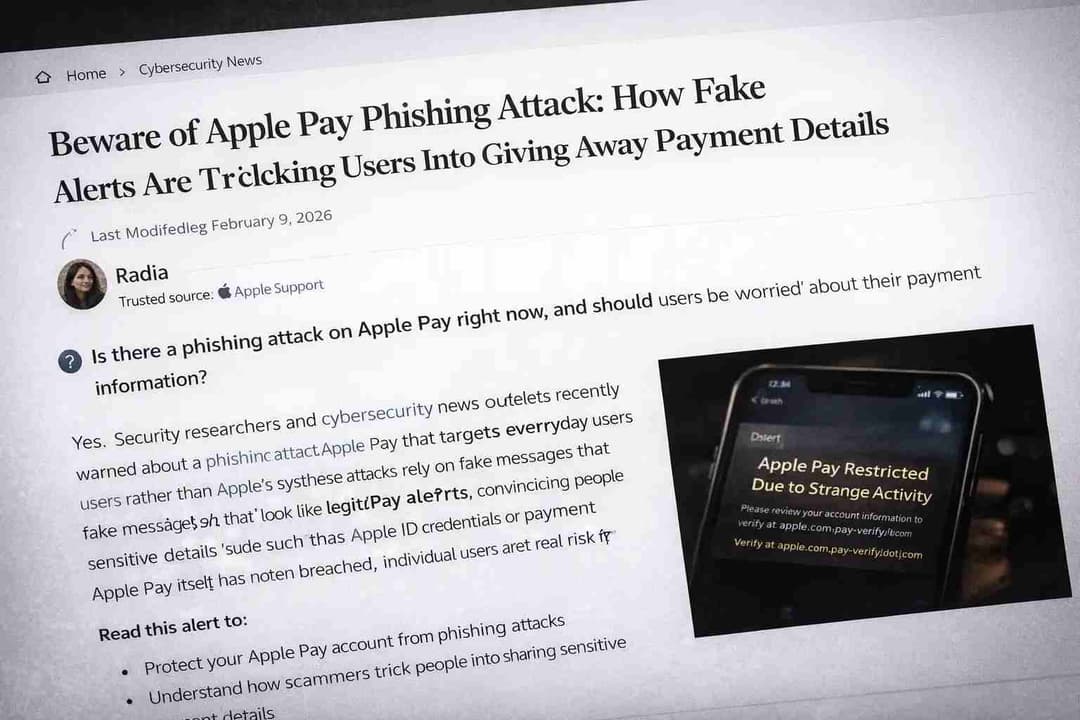
Phishing Attack Explained in the Context of Apple Pay
A phishing attack explained in the Apple Pay context looks different from older email scams. Attackers rely on urgency and familiarity.
Instead of asking for obvious passwords, these scams often claim there is a payment issue, suspicious activity, or account limitation. The message pushes users to “verify” their Apple Pay account immediately.
This is where the phishing attack on Apple Pay becomes effective. Apple is a trusted brand. Apple Pay is linked to real money. When users see a warning message, many act without double-checking the source.
Why the Apple Pay Phishing Attack Matters Right Now
The current phishing attack on Apple Pay is not about breaking Apple’s security. It is about bypassing human judgment.
Researchers have seen attackers use SMS, email, and even iMessage-style messages to send fake Apple Pay alerts. These messages send people to fake websites that look almost exactly like Apple's official pages.
The risk is both personal and financial. Once hackers get your Apple ID or payment codes, they may try to make unauthorized purchases. They could take over your account or sell your stolen data on black markets.
There have been no reports of a large-scale breach of Apple Pay's infrastructure.
However, individual user compromise remains a serious concern.
How Apple Pay Phishing Attack Works
Understanding how the attack works is the first step toward protection.
Step 1: Send a fake warning
Attackers send a message that looks like a warning about how safe Apple Pay is. It could say that the transaction was denied, that something strange happened, or that the account was locked.
Step 2: Be scared and act quickly.
The message tells people to act right away. People often use words like "locked," "immediate," or "restricted." This emotional trigger is intentional.
Step 3: Create a fake page for verification
People are sent to a fake Apple Pay page that looks real. The logos, fonts, and layouts are very similar to what Apple uses.
Step 4: Get the data
When users type in their Apple ID, credit card number, or one-time passcode, hackers get everything right away.

This is a classic phishing attack that has been updated to work with modern payment systems.
Things That Show You Should Never Ignore Apple Pay Phishing Attacks
You can stay out of a lot of trouble if you notice warning signs early.
It's common to get Apple Pay alerts from phone numbers or email addresses that you don't know. Apple doesn't ask for personal information in random messages.
Bad grammar or strange wording is another sign that something is wrong. Attackers are getting better, but there are still some small inconsistencies.
Links are also very important. When you hover over a link, you can often see a domain that doesn't belong to Apple and looks fishy. If someone asks for your full card number or verification code, you should be very suspicious right away.
These signs are the most important ones to know about phishing attacks.
Picture this:
You receive a text stating that your Apple Pay account has been temporarily limited due to suspicious activity. It looks professional. The timing feels real. You recently made a purchase.
You click the link. The page asks you to sign in and confirm your card details.
This is a phishing attack scam alert in action.
Once entered, your details are gone. After that, the page might even send you to Apple's real site, making you think everything is fine.
How this attack affects users and why it works
A phishing attack on Apple Pay can have effects that go beyond just stealing money.
People who are victims often have their accounts locked, make unauthorized transactions, and have to wait a long time for banks to fix the problem. It's also common to feel stressed out, especially when money is involved, like when you have to make regular payments or save money.
The attack works because it combines technical trickery with mental pressure. The attacker uses trust in Apple as a weapon.
Cybersecurity experts believe it is crucial to educate people about phishing attacks. Relying solely on technical defenses is not enough.
The newest phishing attack trends are aimed at payment apps
More and more, the most recent phishing attacks are going after mobile payment systems.
Attackers know that people use their phones to do things quickly. It's harder to check URLs or see small design flaws on smaller screens.
People are going after Apple Pay, Google Pay, and other similar services not because they are weak, but because they are trusted.
This change marks a new stage in online fraud, where social engineering is faster than technical hacking.
How to Prevent Phishing Attack on Apple Pay
Prevention is practical and realistic.
Always access Apple Pay through your device settings or official Apple apps. Never use links from messages.
Enable two-factor authentication and review login alerts regularly. While this does not stop phishing entirely, it reduces damage.
Report suspicious messages directly to Apple. This helps improve detection and protect others.
Most importantly, slow down. Urgency is the attacker’s strongest tool.
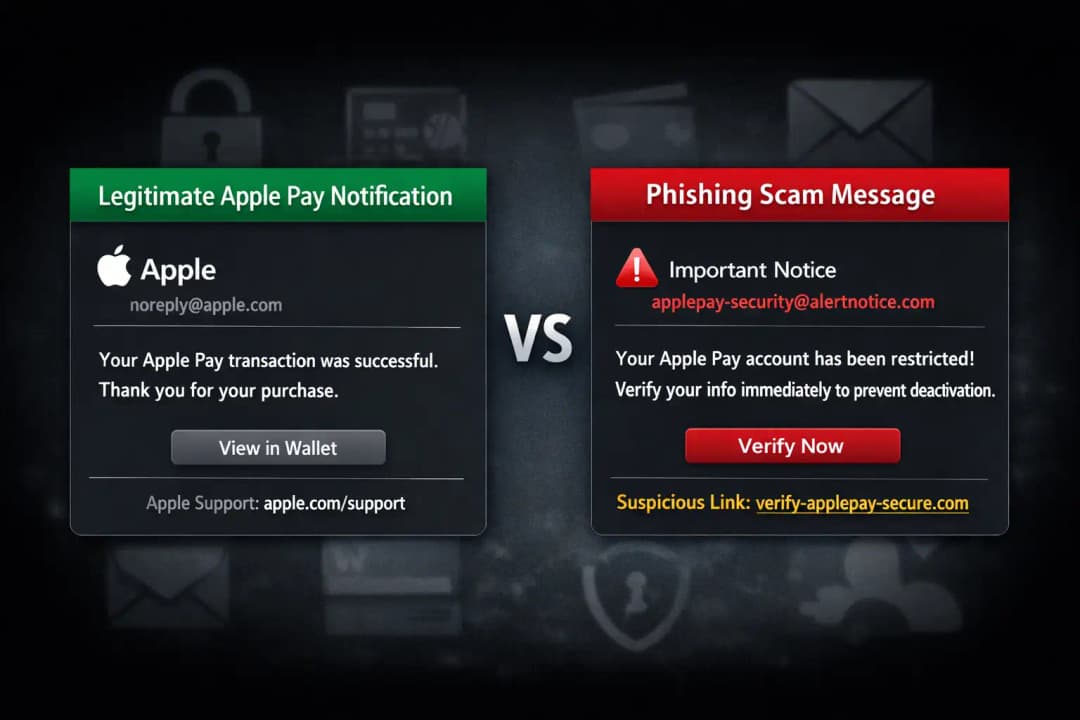
Phishing Attack Alert vs Legitimate Apple Notifications
Apple notifications follow strict patterns.
They do not request full card numbers. They do not ask for verification codes through messages. They direct users to official apps, not external links.
This knowledge can stop a phishing attack before it starts.
What will happen in the future? Will Apple Pay phishing attacks go up?
Phishing attacks on payment services are likely to keep happening based on what has happened so far.
As long as people trust brands more than links, hackers will take advantage of that trust. But people are becoming more aware.
Better filtering, more education, and users being more skeptical are all helping things get better. The future is not hopeless, but we still need to be careful.
People Also Ask: FAQs
In simple terms, what is a phishing attack?
A phishing attack is when someone poses as a trusted company to get your personal or financial information.
Is it possible to hack Apple Pay directly?
There is no proof that Apple Pay's system has been hacked.
Most incidents involve user deception.
How do I report an Apple Pay phishing attack?
Forward the message to Apple’s official reporting channels and delete it immediately.
What should I do if I clicked a phishing link?
Change your Apple ID password, contact your bank, and monitor transactions closely.
Are Apple Pay users being targeted more now?
Payment app users are increasingly targeted because of convenience and trust, not because of weak security.
Key Recommendations
Never trust payment alerts received via random messages
Use official apps for verification
Educate family members who use Apple Pay
Treat urgency as a warning sign
Conclusion
The phishing attack on Apple Pay is not about breaking Apple’s defenses. It is about exploiting human trust. Staying informed, slowing down, and verifying sources remain the most effective defenses. Awareness is not optional anymore. It is essential.
When this happens, you should keep an eye on the deep and dark web because stolen Apple ID credentials and phishing kits often show up in underground forums before scams spread. Getting a head start on these things can help send out alerts faster and stop phishing campaigns that use Apple Pay from spreading.





